How to Create an Interactive Event Map for Your Event or Festival
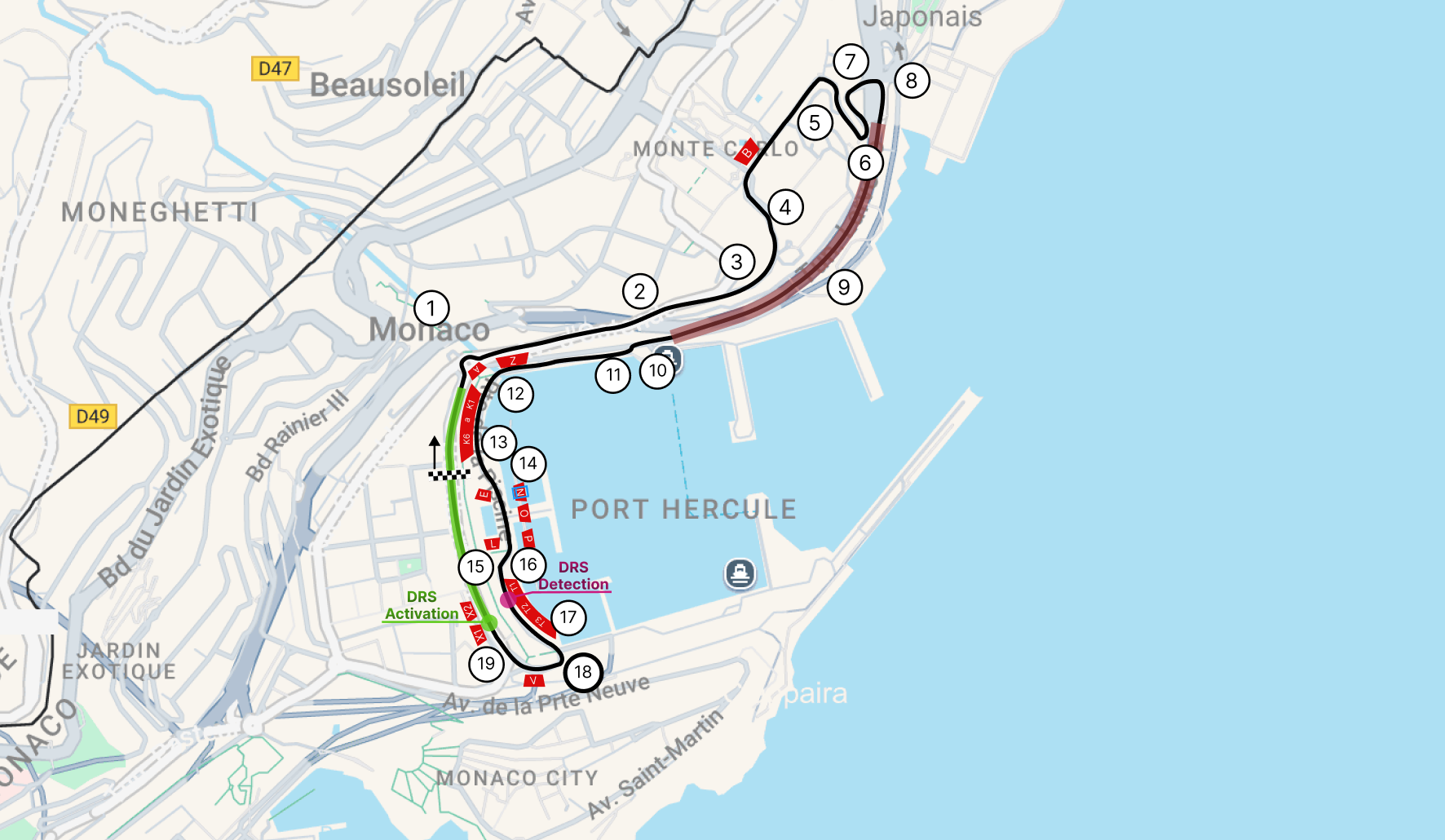
Planning an event—whether it’s a festival, sports race, conference, or market—comes with one common challenge: helping attendees find their way around. A clear, well-designed event map can make a huge difference in the overall visitor experience.
In this guide, I’ll show you how to create your own interactive event map with markers, routes, custom shapes, and more. We’ll use the Formula Grand Prix in Monaco as an example and build the map with Event Map, a tool that makes it easy to create, share, and embed interactive maps on both desktop and mobile devices.
What Is an Interactive Event Map?
An interactive event map is a digital map that shows attendees where to find important locations and features throughout your event.
Depending on the type of event, your map can include:
- Entrances and exits
- Seating areas and grandstands
- Food and drink stalls
- Emergency services
- Exhibitor booths
- Stages and activity areas
- Walking routes and directions
- Restrooms (WCs)
- Agendas organized by location
Unlike a traditional static map image, an interactive map allows visitors to zoom in and explore the venue, view additional information, find their current location, and filter locations by category.
Do You Need a Map for Your Event?
In short: yes.
A well-designed event map can make your event easier to navigate while reducing the workload for your staff. Here are some of the main benefits:
- Improve the attendee experience: Help visitors quickly find the places they need.
- Reduce staff workload: Answer fewer repetitive questions about directions and locations.
- Prevent confusion and congestion: Make it easier for visitors to understand the layout and move between areas.
- Increase engagement: Help attendees discover more areas, activities, and attractions at your event.
- Promote partners and sponsors: Use clickable locations to showcase vendors, exhibitors, and sponsors.
If your map can be shared online or embedded directly into your website, it can also help visitors plan their experience and build excitement before the event starts.
Case Study: Formula Grand Prix in Monaco
Let’s take a look at the iconic Formula Grand Prix in Monaco.
With a race circuit running through a dense urban environment, organizers need to communicate a large number of locations and points of interest to spectators. An interactive event map can bring all of this information together in one convenient place.
For example, a custom map could include:
- Grandstands: Show seating areas, seat numbers, and access points.
- Points of interest: Highlight landmarks, viewing areas, and other important locations.
- Hospitality areas: Display VIP zones, lounges, and hospitality facilities.
- Track layout: Map the circuit, pit lanes, paddocks, tunnels, and other track-related areas.
With an interactive map, spectators can explore the circuit before race day, find their grandstand more easily, and plan their route around the event.
How to Build Your Event Map
For this example, we’ll use Event Map. It allows you to create interactive maps without writing any code and includes a built-in CMS for managing locations, routes, categories, and other map data.
Here’s how to get started:
1. Create an Account
Sign up at eventmap.app and create your account. Event Map offers a generous free plan as well as simple, predictable pricing as your audience grows.
2. Create a New Map
Click the "+" icon to create a new map. You’ll be taken directly to the Map Editor, where you can start building your event map.
3. Add Routes
For our Monaco Grand Prix example, we can add two routes: one representing the complete race track and another highlighting a specific section, such as the tunnel.
4. Add Track Points
Add markers for important turns, landmarks, and other locations along the circuit.
To make this easier to manage, you can use the Auto-numbering feature in the category settings. This automatically numbers your track points, saving you from having to label each one manually.
5. Define Seating Zones
Use custom shapes to outline grandstands and other seating areas. You can then add text labels on top of the shapes to make each area easy to identify.
6. Add the Finishing Touches
Finally, add custom markers and images to highlight important features, such as the start and finish gates or the direction of the circuit.
Once these elements are in place, you have a detailed and interactive event map that visitors can explore from their phones or computers.
You can learn more about the available map features in our knowledge base.
Have a question? Feel free to contact us. Our support team doesn’t rely on AI bots, so you’ll always get a response from a real person.
Publishing and Privacy
Once your map is complete, you can share it on your website, social media channels, or through email.
One of the key advantages of Event Map is its approach to privacy. Unlike embedded Google Maps and Google My Maps, Event Map doesn’t collect user data. This means you don’t need to request additional cookie or user-data permissions just to display your event map.
Simple, Transparent Pricing
Event Map offers straightforward pricing:
- Free: Up to 100 visitors per month.
- Pro: €5/month for up to 5,000 visitors—roughly 160 visitors per day—with unlimited markers, custom data, and multiple map styles.
With Event Map, you can create a professional, interactive event map in just a few minutes—without coding or complicated mapping software.
If you have any questions, suggestions, or feedback, feel free to contact the Event Map team at [email protected].